

Best Chore Apps for Families
A fair comparison of family chore apps, checklists, points, allowance, and gamified quests, plus how to pick the right fit for your kids.
You have tried the fridge chart. You have tried the whiteboard. You have tried repeating "please put your shoes away" until your voice goes hoarse. At some point, many parents wonder: is there an app for this?
There is, and the landscape is bigger than a single "best chore app" list might suggest. Some tools are digital checklists. Some tie chores to allowance. Some turn household jobs into games. The right pick depends on your kids' ages, how much screen time you want involved, and whether you need structure: motivation: or both.
This guide walks through the main categories fairly, then highlights where StarKid fits if you want quests, boss battles, and family challenges, not just another to-do list with stickers.
Why families switch from paper to apps
Paper charts work until they don't. Stickers fall off. Someone forgets to update Saturday's jobs. A younger sibling "accidentally" adds extra checkmarks. Apps solve a few predictable pain points:
- Visibility: everyone sees what's done and what's left
- Consistency: the same quests show up daily without reprinting
- Rewards: stars, points, or allowance link to completed work
- Less nagging: kids check the app instead of waiting for a reminder lecture
Apps are not magic. They still need clear expectations, age-appropriate tasks, and a parent who follows through. But they can turn "Did I already do that?" into a tap-and-done moment, which matters on busy school mornings.
For age-appropriate task ideas before you pick software, start with the Ultimate Guide to Chores by Age.
Category 1: Simple checklist and reminder apps
These apps focus on lists, schedules, and notifications. Think shared family calendars with chore columns, recurring tasks, and check-off buttons.
Best for: families who want organization without heavy gamification; teens and tweens who respond to clarity more than cartoon rewards.
Strengths: straightforward setup, often works across devices, good for predictable weekly routines.
Watch-outs: can feel like "another thing parents manage" if kids don't engage; motivation may lag without a reward layer.
If your main problem is remembering what needs to happen, not getting kids to care, a checklist app may be enough. Pair it with a simple reward at home (movie night, extra story) and keep tasks short.
Category 2: Allowance and money-management apps
These connect chores, or family jobs, to earning, saving, and spending. Some automate allowance on a schedule; others pay per completed task.
Best for: older kids learning financial habits; families ready to separate "baseline contribution" from paid extras.
Strengths: teaches budgeting in a practical way; reduces cash-in-envelope chaos.
Watch-outs: blurring "we all live here" chores with paid work can backfire if expectations aren't clear. Read our Ultimate Guide to Allowance before tying every dish to a dollar.
Many families use this category for teens while keeping younger kids on stars and non-cash rewards.
Category 3: Gamified chore apps
This is where cleaning stops sounding like cleaning. Tasks become quests. Completing a streak might unlock a reward. Some apps add timers, levels, or cooperative family goals.
Best for: elementary-age kids who need energy and story, not just a checkbox.
Strengths: reframes chores as missions; novelty keeps interest longer than a static list.
Watch-outs: games need rotation; if every day feels identical, engagement drops. Combine app quests with offline games from Turn Cleaning into a Game.
Category 4: All-in-one family hubs
Some platforms bundle chores, calendars, shopping lists, and messaging. They're the "family command center" approach.
Best for: households already juggling multiple schedules and wanting one login.
Strengths: fewer apps to maintain; shared context for both parents.
Watch-outs: feature overload, if kids only need three daily tasks, a lightweight tool may beat a dashboard they'll never open.
How to choose: five questions
Before you download anything, answer these honestly:
- How old are your kids? Preschoolers need picture quests and tiny lists. Tweens need fairness and autonomy.
- Checklist or game? Some kids want calm clarity; others need boss battles.
- Allowance linked or separate? Decide before the app decides for you.
- Who marks tasks complete? Trust-but-verify works; auto-approve everything does not.
- Screen time comfort? If the app lives on a kid device, set boundaries like any other app.
| Need | Lean toward |
|---|---|
| Minimal setup, teen-friendly | Checklist and reminder apps |
| Money lessons | Allowance-connected apps |
| Young kids, low motivation | Gamified apps |
| Whole-family scheduling | All-in-one hubs |
Where StarKid fits
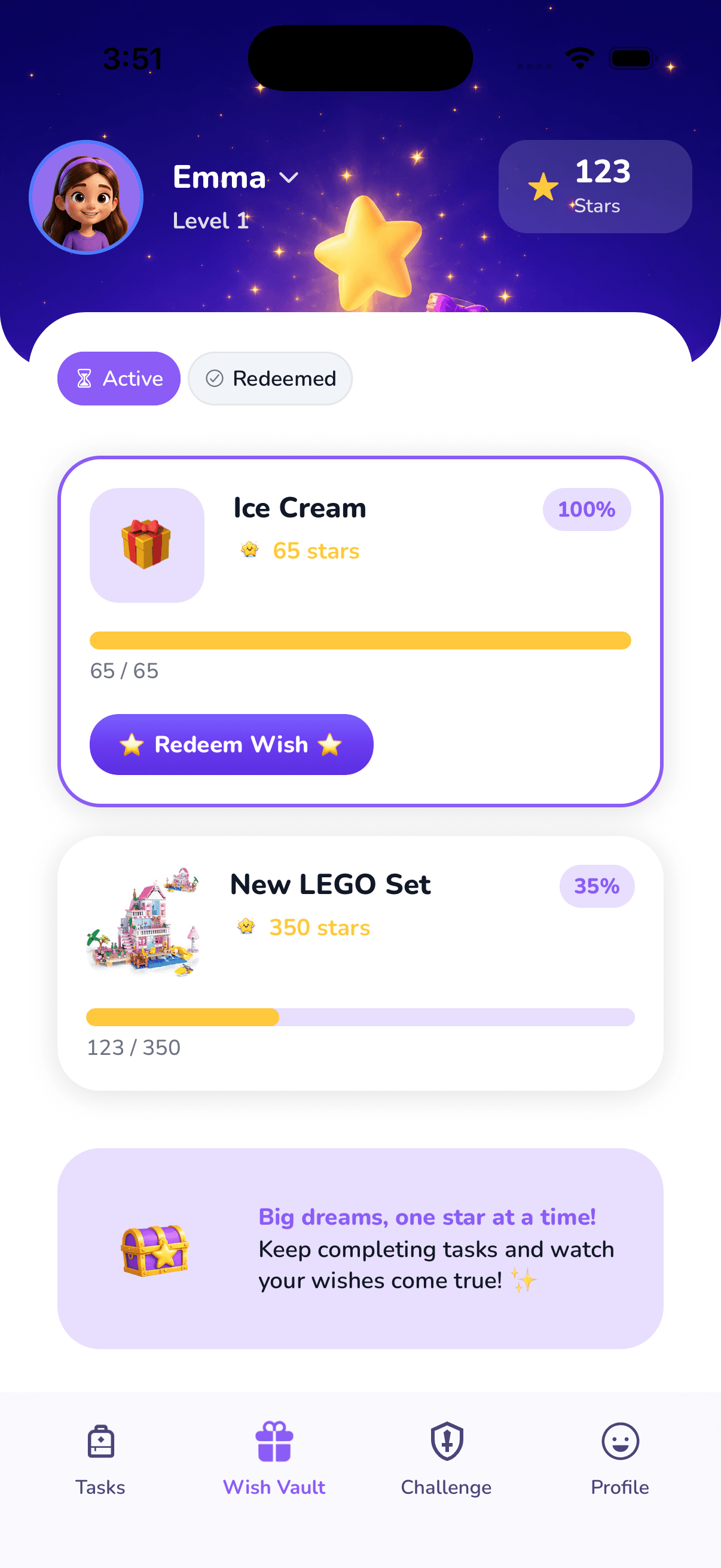
StarKid sits in the gamified family chore space, with a specific angle: quests, boss battles, stars, and family challenges designed for kids who tune out the word "chore."
Here's what that looks like in practice:
- Quests: daily and weekly missions with clear finish lines ("Plate Patrol," "Room Reset," "Laundry Sidekick")
- Boss battles: bigger jobs framed as cooperative wins, not solo drudgery
- Stars and rewards: kids earn toward goals they help choose, without turning every family contribution into a transaction
- Family challenges: shared goals that reward teamwork instead of sibling scorekeeping
StarKid is not trying to replace your parenting. It's trying to replace the nagging loop: the fifth reminder to feed the dog, by giving kids a place to see the mission, complete it, and feel the win.
If you are coming from paper, our Free Chore Chart Printable guide explains what a good chart includes; StarKid is the "skip the reprint" step when you are ready.
Comparison mindset: fair, not fanatical
No app fixes unclear expectations. The best chore app in the world will struggle if a seven-year-old has twelve daily jobs and a teenager has zero. Balance workloads using the Ultimate Guide to Chores by Age, then pick software that matches how your kids actually get motivated.
Checklist apps win on simplicity. Allowance apps win when money talks. Gamified apps win when play is the hook. StarKid aims for families who want that hook and a system that lasts past the first enthusiastic week.
Getting started without overwhelm
Pick three daily quests and one weekly mission per kid. Run the app for two weeks before adding complexity. Celebrate streaks lightly, perfection isn't the goal; belonging and competence are.
Tonight's experiment can be small: one quest, one star, one clear "mission complete." Whether you choose a checklist tool, an allowance tracker, or StarKid's quest board, the win is the same: less friction, more follow-through, and a kid who starts to see themselves as someone who helps.
Frequently asked questions
Most families introduce apps around ages 5-7, when kids can read a short task list or follow picture-based quests. Younger kids often do better with a parent running the app beside them.
Related articles

The Ultimate Guide to Chores by Age
A complete, age-by-age chore system for kids, from toddlers to teens, with lists, tips, and how to make chores stick without yelling.
Read article →
The Ultimate Guide to Allowance for Kids
How to set up allowance, decide if it should connect to chores, and teach money habits, without turning every sock into a paycheck negotiation.
Read article →
Free Chore Chart Printable
Build a printable chore chart that kids actually use, daily and weekly checklists, setup tips, and when to go digital.
Read article →Ready to turn chores into adventures?
StarKid tracks chores, rewards, and streaks automatically—so your family builds habits without the daily battles.